在Windows上查看YUV格式图片
- 下载YUV查看器的压缩包。
- 解压YUV查看器的压缩包。
- 双击
YUView.exe文件,打开YUView的界面。 - 选择“File”菜单中的“Open File”菜单项,选择YUV格式的文件,并点击“打开”按钮。
- 如果在中间区域未显示图像,在右侧的
Raw File Properties窗口,输入Width的值为3264,Height的值为2448,接着在YUV Format对应下拉框中选择Custom...这一项,弹出“Custom YUV Format”窗口。

- 在“Custom YUV Format”窗口中,勾选“UV(A) Interleaved”这一项,然后点击“OK”按钮。
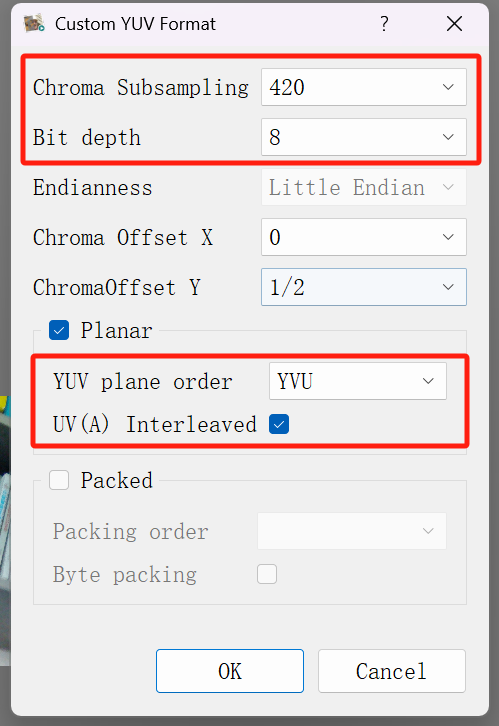
- 完成设置后,在
Raw File Properties窗口中,YUV Format对应的值显示为YUV(IL) 4:2:0 8 bit。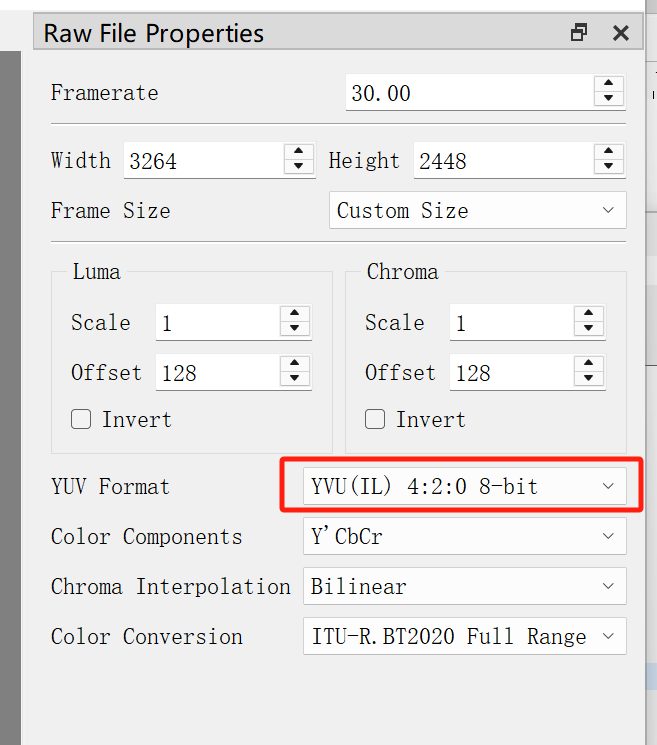
- 在主窗口的中间部分显示出了图像。